Now live on the App Store · Android coming soon

Turn documents into structured, connected records.

Scan a document. LifeVault extracts key details — you review, edit, and save. A structured record is created instantly, with the original document always one tap away — from the record or your Documents Vault, where it’s automatically saved.

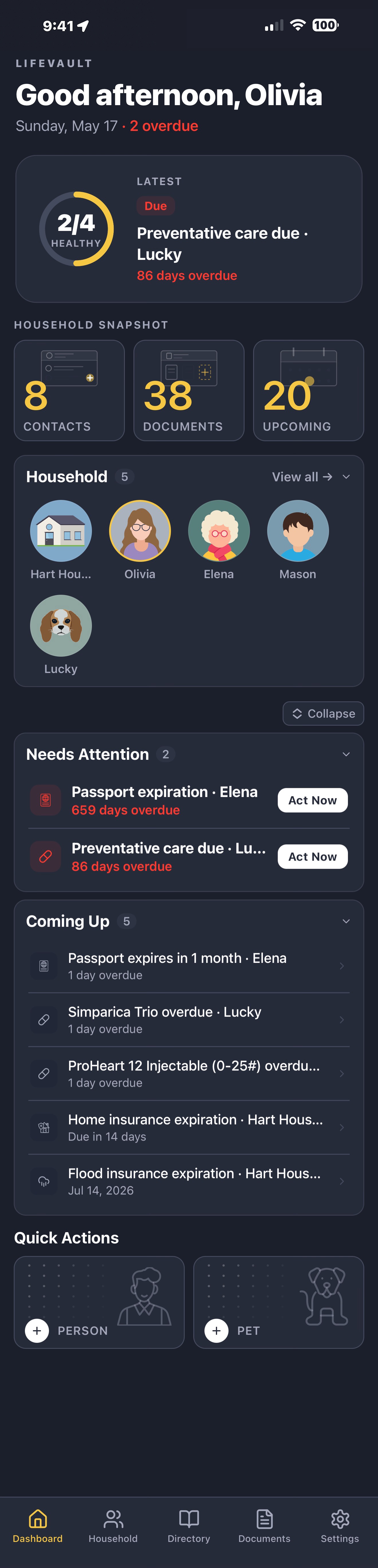
LifeVault digital family binder dashboard showing organized household profiles for family members and pets
Driver's License
Auto-extracted
Lucky · Vaccines
3 due soon
Olivia · Timeline
Dosage changed · Aug
How it works

Documents become records. Records become a system.

Most apps store files. LifeVault extracts data, structures records, and links everything across profiles. Scan a document — we extract what we can, you stay in control. Then generate a complete, shareable summary when you need it.

Step 01

Scan, upload, or snap any document, card, or photo.

Step 02

Key details are extracted automatically. Review, edit, and confirm.

Step 03

Structured record saved and linked to the right person or pet.

Driver's License
State ID, REAL ID
Passport
Adult & child
Prescriptions
Dose, refills, prescriber
Vaccine Cards
CDC, school, travel
Insurance Cards
Health, dental, vision
Pet Records
Vax, microchip, vet
Birth Certificates
Originals & copies
+ 80 more
From wills to wifi
Documents & Directory

Every record linked. Every document connected.

LifeVault links every structured record — insurance, prescriptions, contacts, documents — to the right family member or pet. Search by person, filter by record type, and find what you need — even in the middle of an ER visit.

Three levels of organization

1
Attached to a record A prescription photo attached to that exact prescription record. A referral letter linked to a specialist contact.
2
Linked to a profile Olivia's primary care physician. Lucky's vet. Mason's school nurse. Each contact links to one family member or several — and auto-filters when you open that person's profile.
3
Added to the household The plumber. The family lawyer. The home warranty PDF. Household-level information saved once, accessible for everyone.
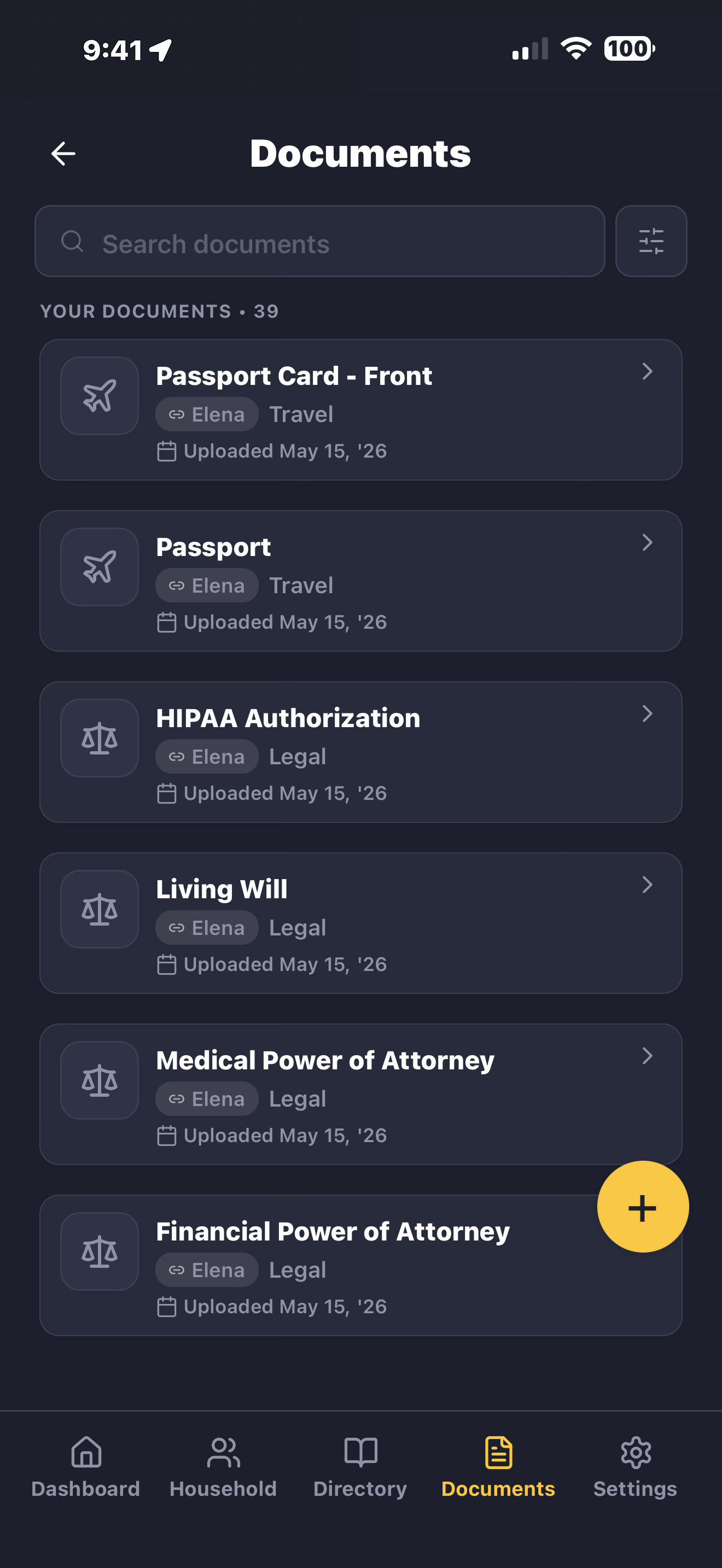
Documents
LifeVault Documents screen — every document linked to a profile, with record type tags like Insurance, ID, Medical
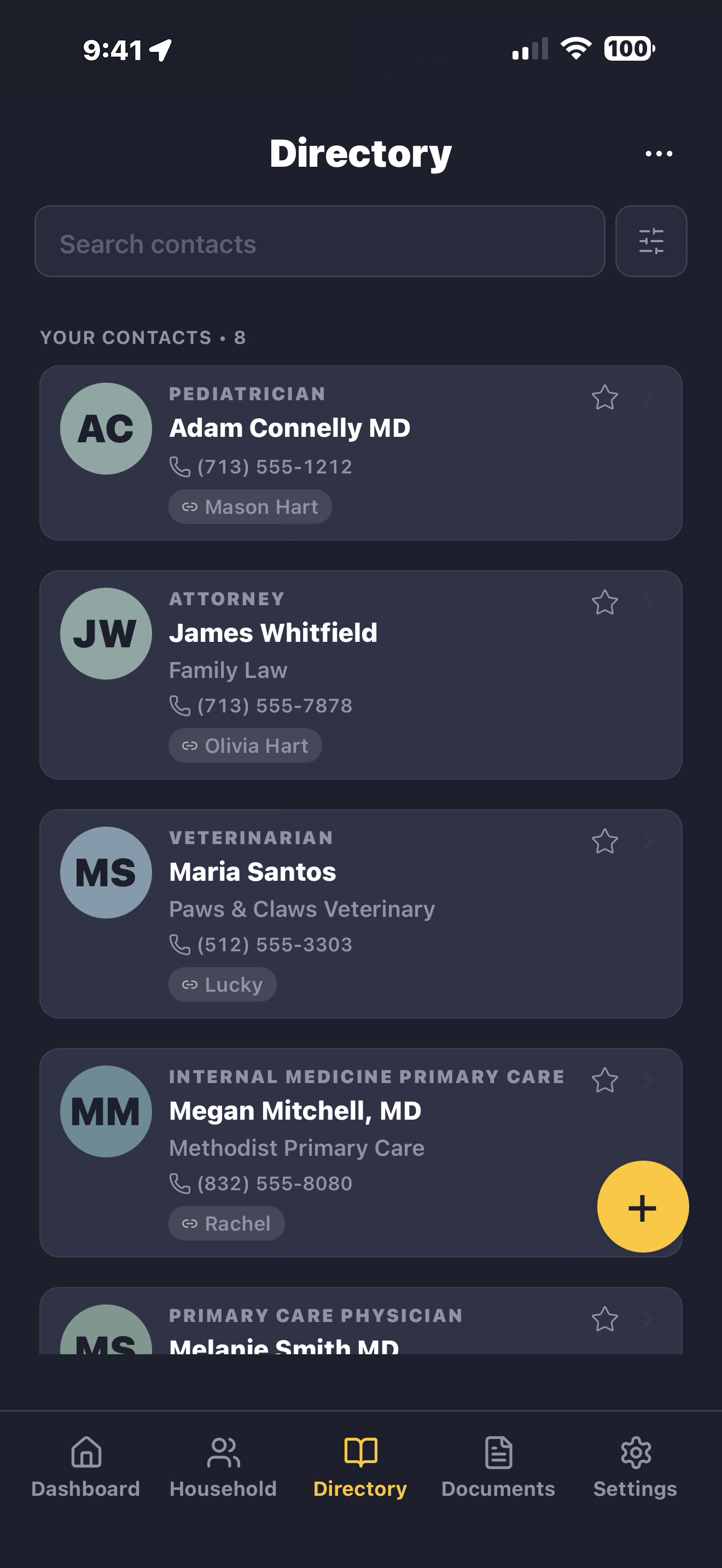
Directory
LifeVault Directory screen — contacts scoped to household, single profiles, and multiple profiles
Built for real households

Your whole household.
Every person, pet, and detail.

Every document you scan becomes a structured record, automatically linked to the right person or pet. Medical records, insurance, contacts, caregiver notes — all connected, always ready to share.

Household
Hart Household

The address, access codes, wifi passwords, warranties, HVAC filter dates, the family plumber. Every household detail organized in one place — findable when you actually need it.

Home details & access Insurance & property Utilities & services Vehicles Maintenance & repairs Emergency & safety Property documents Notes & checklists
Hart Household profile — scroll through Home Details, Insurance, Utilities, Vehicles, Maintenance, Emergency, Property Documents, and Notes

One household. Your mode.

Every profile — kid, adult, or pet — adapts to your preference, light or dark. Tap to flip.

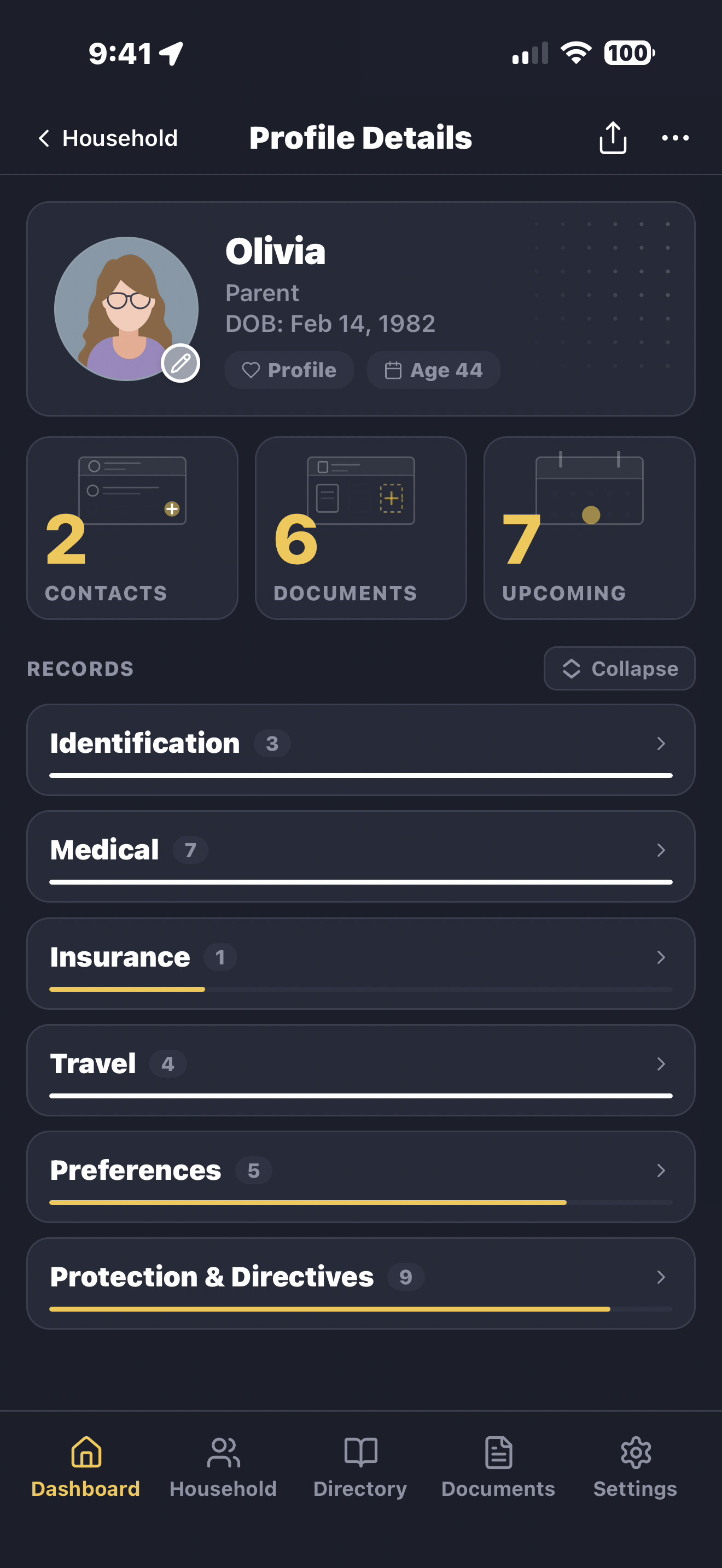
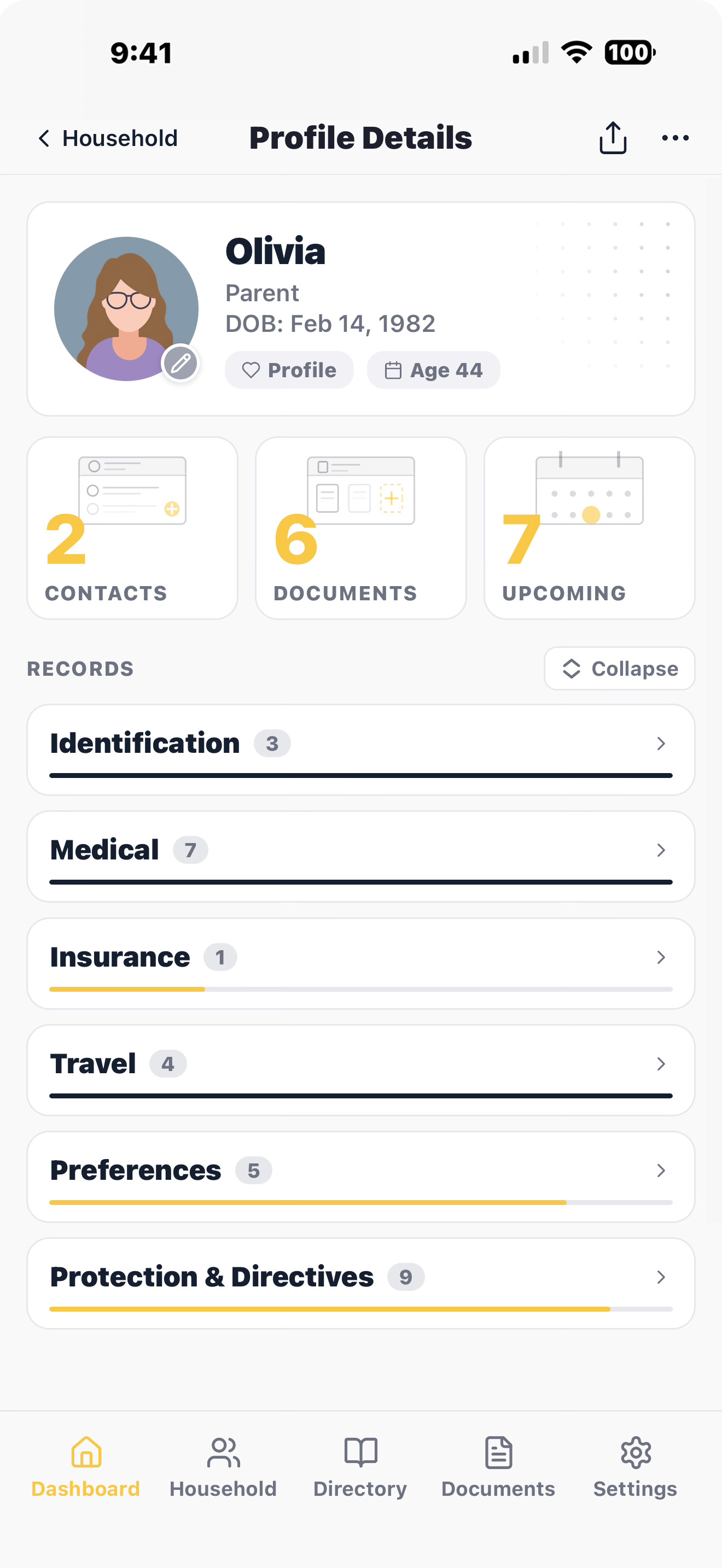
Olivia's profile — driver's license, medical history, insurance, travel docs, preferences, and directives
Adult
Olivia
Driver's license, medical history, insurance cards, prescriptions, travel documents, and advance directives — organized and searchable.
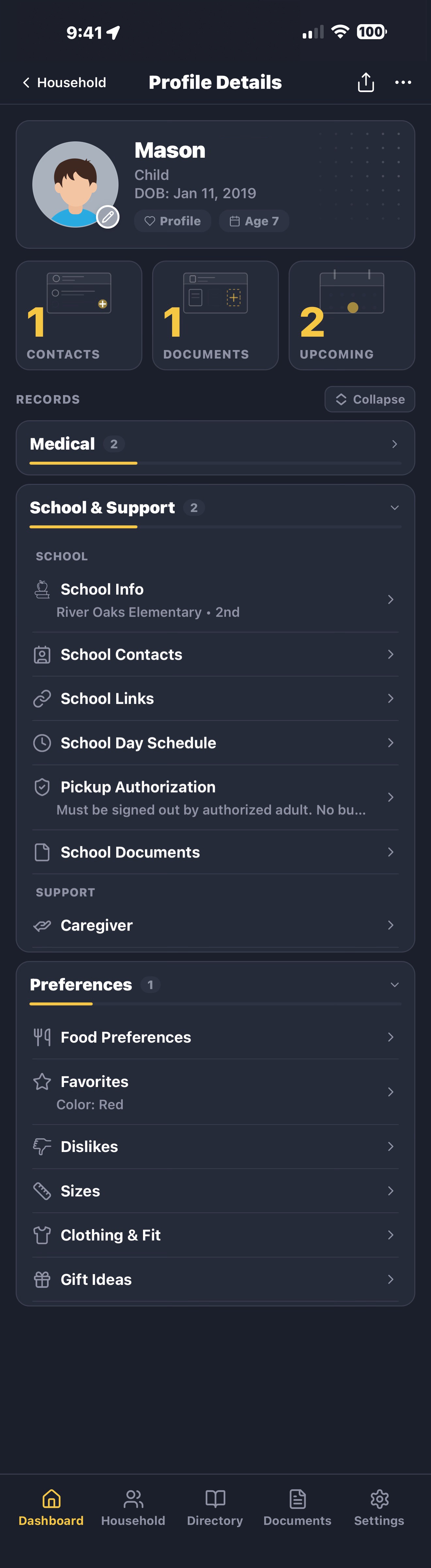
Mason's profile — birth certificate, allergies, vaccinations, school info, pickup authorization, and support guide
Child · 7
Mason
Vaccination records, allergies, school contacts, pickup authorizations, and a support guide for teachers and caregivers.
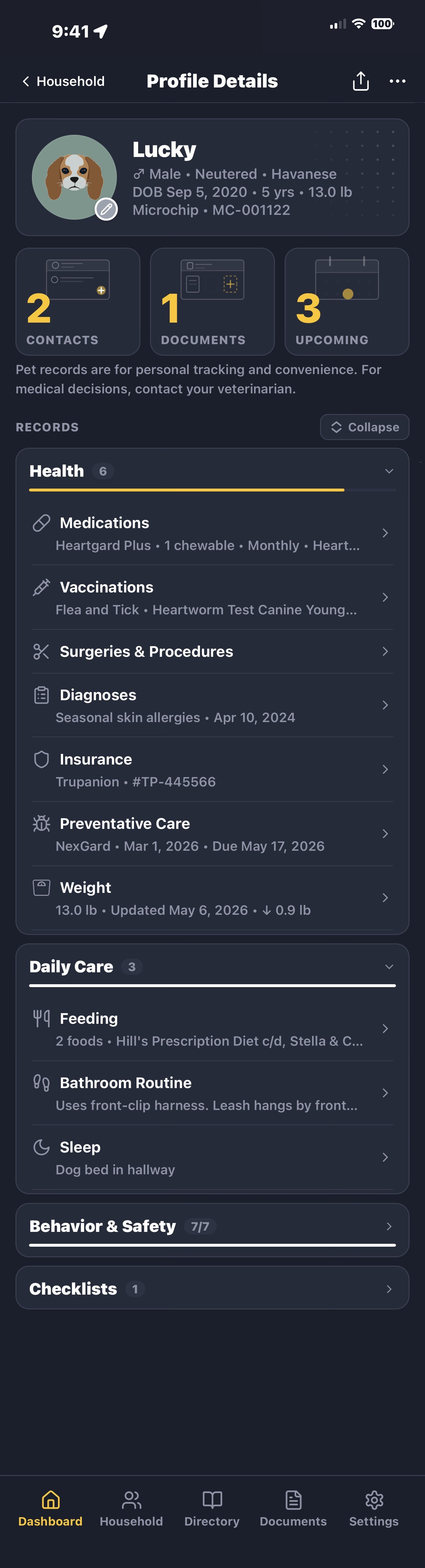
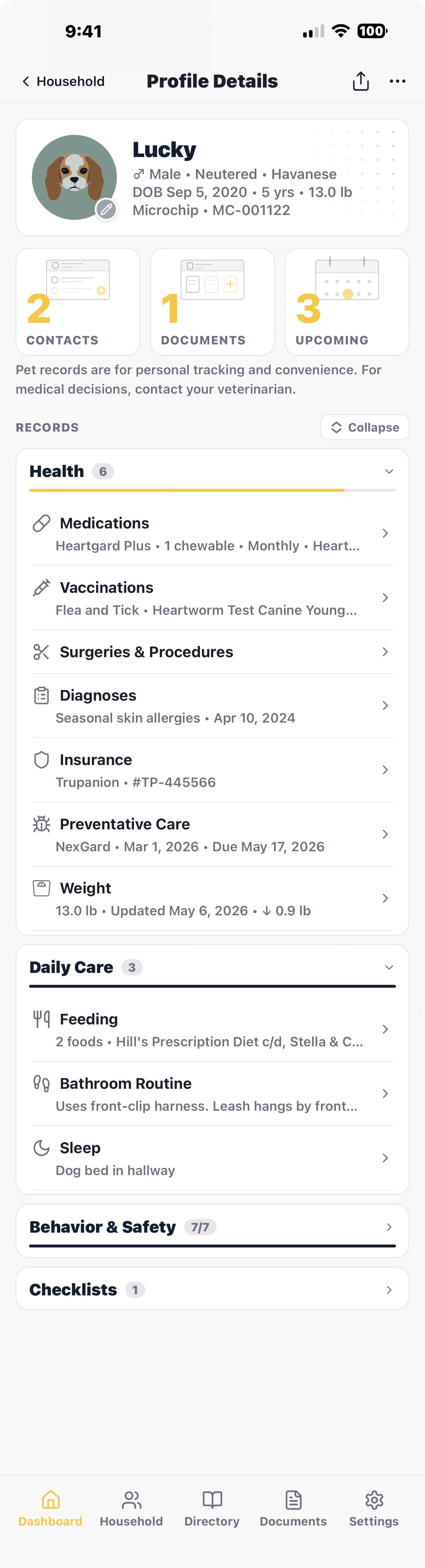
Lucky's profile — medications, vaccinations, surgeries, daily care routines, and behavior & safety guide
Pet · Havanese
Lucky
Medications, vaccination records, vet contacts, feeding schedules, and a behavior guide for pet sitters and boarding.
Who it's for

Built for the people quietly holding everything together.

LifeVault extracts data from documents, structures records, and links everything across profiles — built for the people who carry the mental load of keeping a household prepared.

Families with young kids

Pediatrician contacts, allergy lists, vaccination records, school forms, and pickup authorizations. Hand a new sitter or grandparent what they need to know.

Pet owners

Vaccination records, vet contacts, microchip numbers, medication schedules, feeding routines, and behavior notes. Pet boarding, sitters, and travel become genuinely simple.

Families with special needs

Accommodations, sensory needs, calming strategies, triggers to avoid, and caregiver instructions — organized in a support guide that travels with the person who needs it.

Families who travel

Passports, travel insurance, vaccination records, allergies, emergency contacts, and known traveler numbers — organized and shareable before you leave.

Timeline & history

Not another document storage app.
A living history.

Storage apps hold files and forget them. LifeVault turns records into a timeline you build — so the story of someone's care is something you can see, not something you piece together later. You decide what belongs on it — and nothing you replace is ever lost.

Jan 2025
Lisinopril started
For high blood pressure — 10 mg daily.
Dr. Reyes · Cardiology Rx label scanned
Mar 2025
Cataract procedureCustom event
Outpatient · Methodist Hospital.
Dr. Okafor Discharge summary
Jun 2025
Hospital stay — 4 daysCustom event
After a fall at home — logged so the pattern stays on record.
Aug 2025
Lisinopril — dosage increased
Now 20 mg. The previous version is kept, so you can see what changed and when.
Nov 2025
Driver's license renewed
Tapped Renew before it expired — the new license is current, the old one saved to Archives.

You choose what's on it

Flip “Add to timeline” on any record, or add a custom event like a hospital stay, rehab, or a fall. A deliberate history — not a noisy feed.

Renew or replace — keep every version

Renew a driver's license or replace a passport and the new one becomes current — the old version is saved to your Archives, with the dates it was valid. Nothing is overwritten.

Reminders before things lapse

IDs, insurance, vaccines, and prescriptions remind you before they expire — so you can renew in time instead of scrambling. Your records are always yours.

Customize each profile

Show only what matters
for each person.

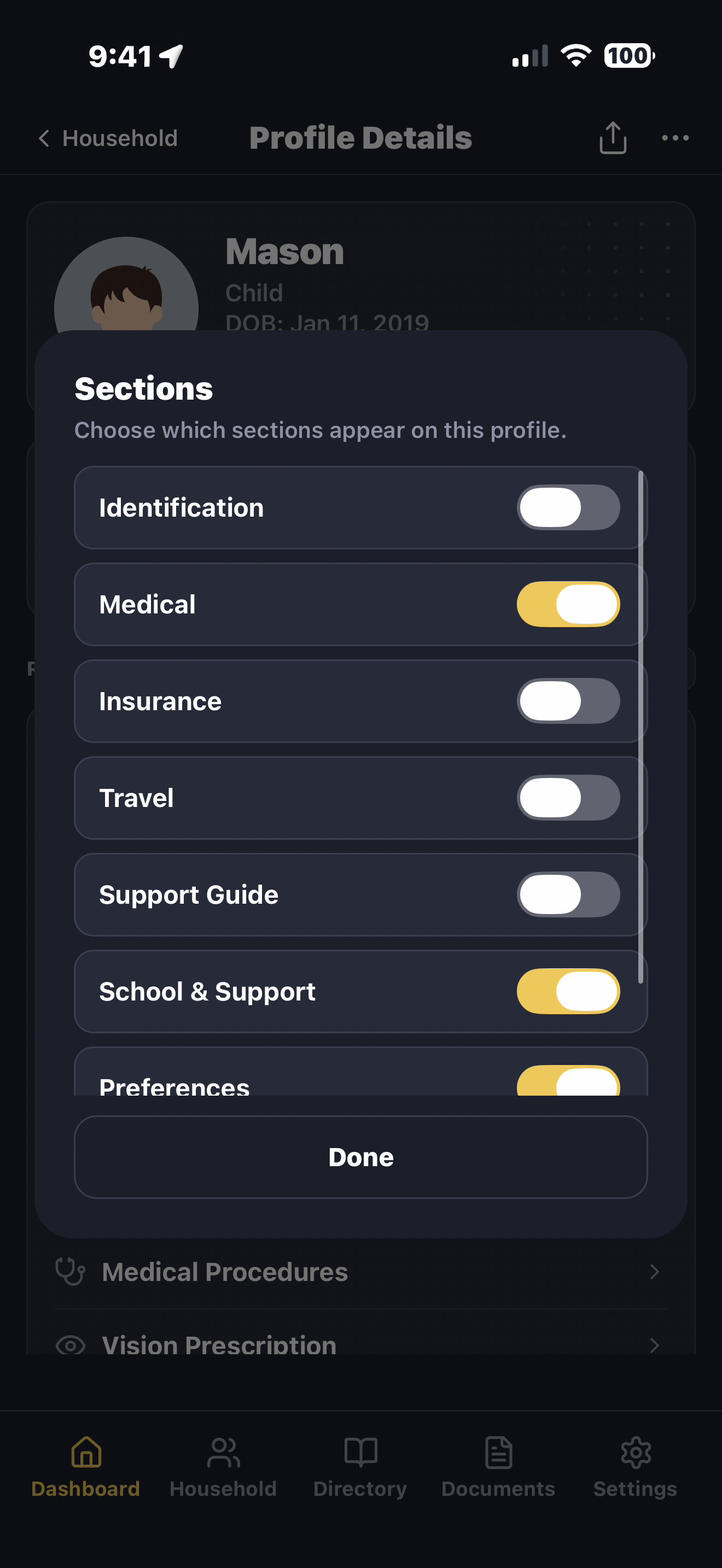
Not every family member needs the same sections. Toggle categories on or off per profile so each person's information stays focused, relevant, and easy to share — no clutter, no confusion during stressful moments.

1
Toggle what's relevant For Mason (age 7), turn off Travel and Preferences. Turn on School & Support — that's where his life happens.
Sections toggle modal showing which profile sections appear for Mason: Identification, Medical, Insurance on — Travel, Preferences off — School & Support on
2
Get a profile that fits No Travel. Preferences that matter. Just the sections important to your 7-year-old.
Mason's customized profile showing only Identification, Medical, Insurance, Support Guide, School & Support, and Preferences — kid-appropriate sections only

Same flexibility, every profile. Olivia can focus on passports and prescriptions before a trip. Lucky only needs vet records and a behavior guide. Hart Household can skip utilities if the home is rented. Your family binder, your way.

Support guides that travel with the person

Build it once.
Share it with anyone
who needs it.

Sometimes the most important information isn't medical. It's knowing what helps someone feel safe. What causes stress to escalate. How to calm overwhelming situations before they spiral. LifeVault helps families organize support strategies, routines, accommodations, medications, emergency contacts, and caregiver instructions — so teachers, caregivers, family members, and support staff have the context they need from the very beginning. Hand a teacher the guide on day one and they'll know what calms a child before a hard moment escalates — instead of learning those triggers the hard way.

1
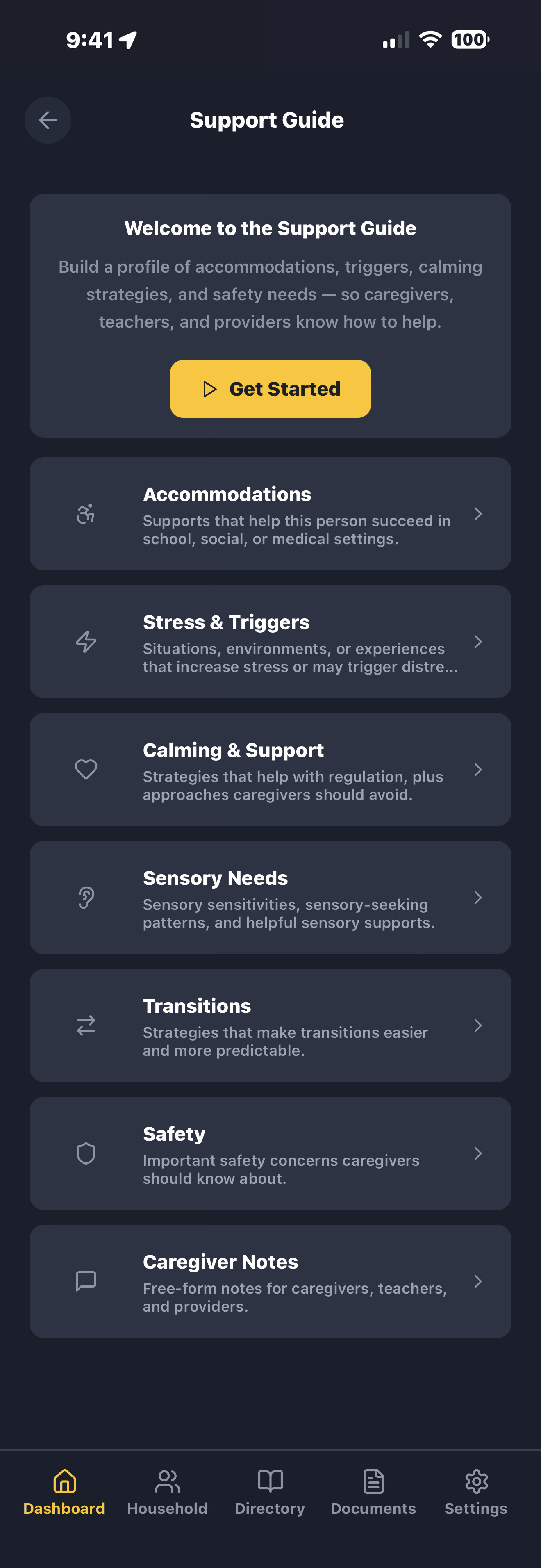
Complete the support guide once. Modify it anytime. Answer thoughtful prompts across 7 sections. Save as you go.
Support Guide builder showing 7 sections: Accommodations, Stress & Triggers, Calming & Support, Sensory Needs, Transitions, Safety, and Caregiver Notes
2
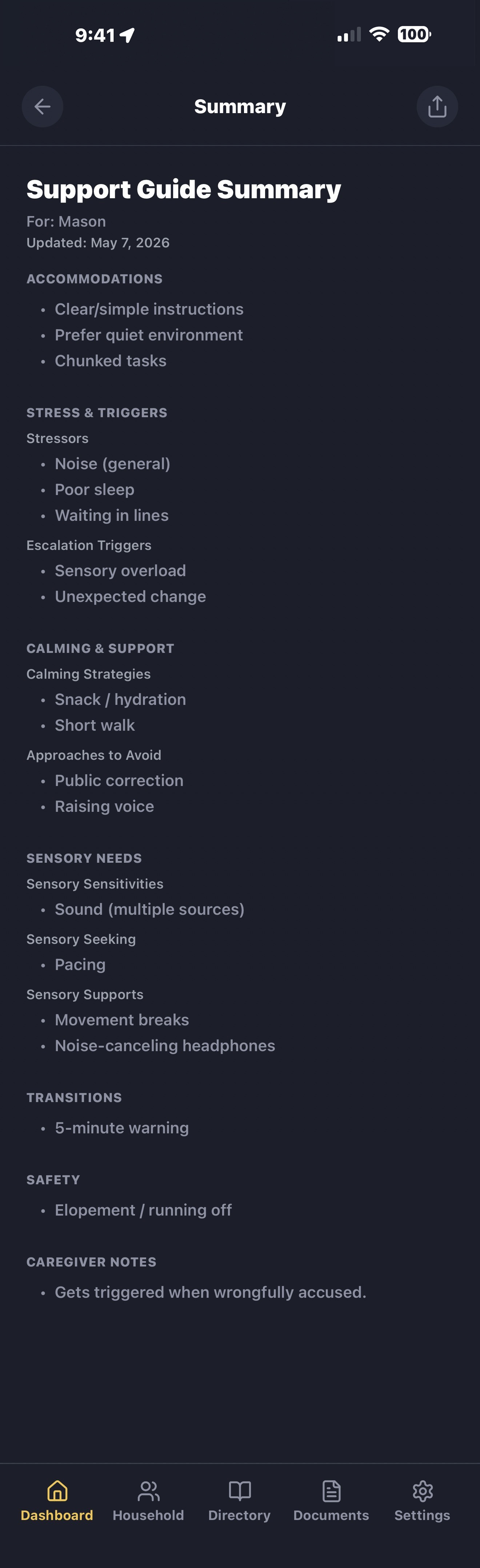
Share the result A clean, plain-language summary. Hand it to anyone who needs it.
Mason's Support Guide Summary — scroll through Accommodations, Stress & Triggers, Calming & Support, Sensory Needs, Transitions, Safety, and Caregiver Notes
Lived experience, not generic templates Designed by a parent who wished caregivers and teachers had been given better context from the start — before difficult situations escalated.
Plain language, no jargon Reads like a person describing another person — not a clinical form.
Shareable, exportable, printable Hand it to a new sitter. Email it to a teacher. Export or print a copy for a substitute. Share it with a doctor. Ready when it matters most.
LifeVault

“In a crisis, finding information shouldn’t be harder than providing care.”
— Rachel, founder

Read the story behind LifeVault →
Private family organizer

Private by design.
Not by promise.

LifeVault stores your family's records and documents on your device — not on our servers. We never collect your medical records, insurance details, or personal documents. We can't lose them, sell them, or be compelled to hand them over — because we never have them. Information leaves your device only when you choose to share, export, or back up.

On-device storage

Your family's records live on your phone — never uploaded to our servers.

Biometric protection

Unlock the app — or just sensitive records — with Face ID or Touch ID. Your family's information stays protected.

You control what's shared

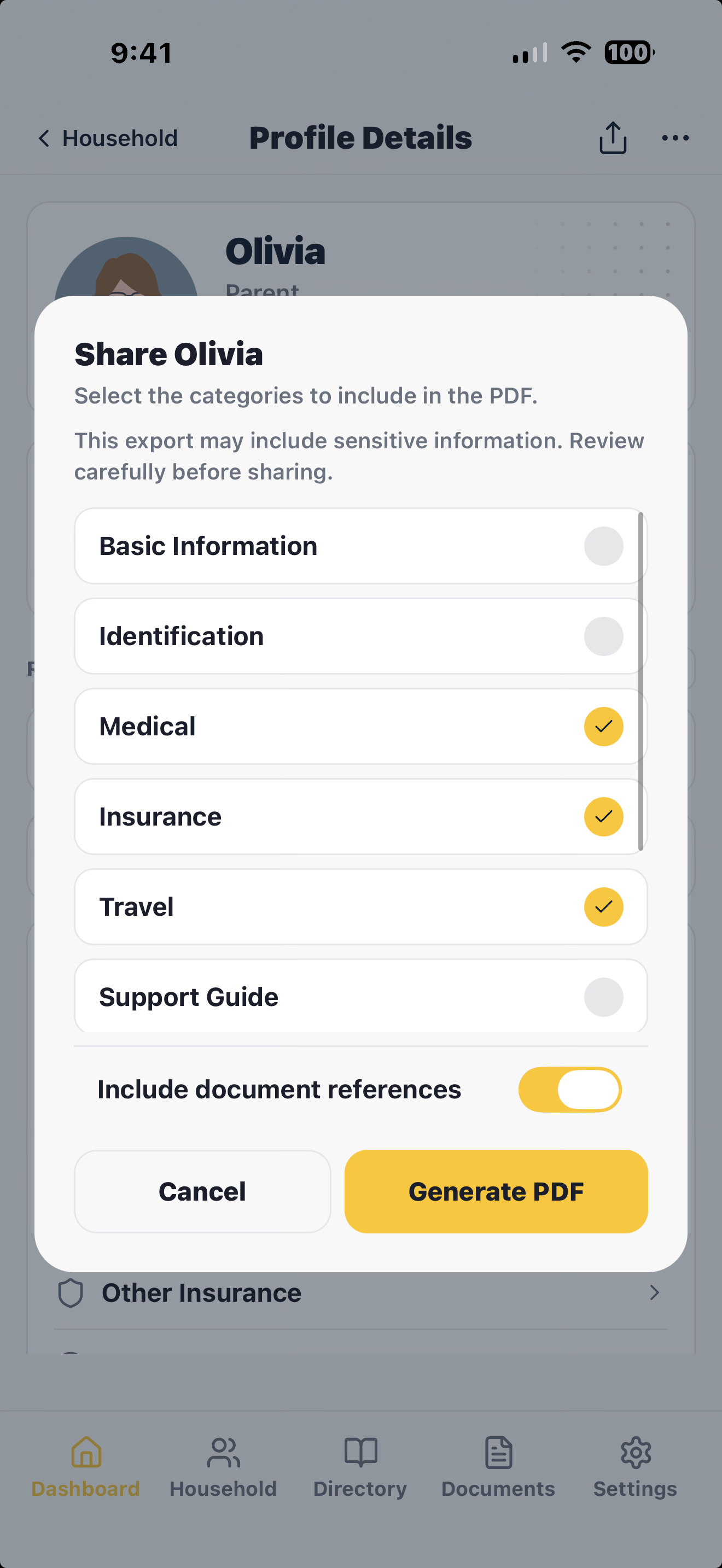
Choose exactly which sections to include before sharing. Send only what a caregiver, doctor, or school needs.

No ads. No data harvesting. No social feed.

No algorithms, no personal data collection. Just your family's organized information.

How LifeVault compares

Most apps store files.
LifeVault organizes your life.

Cloud document vaults lock your family's records behind an account and a subscription. Caregiver apps coordinate help but don't hold your documents. LifeVault does both — privately, on your device.

LifeVault Cloud document vaultse.g. Everplans, Trustworthy, Prisidio Caregiver appse.g. CaringBridge, Lotsa Notes, Files & paper
The basics — most apps cover these
Store documents & files
Share information with family & caregivers
Reminders for important dates
Shared family access — multiple people, one vault
Where LifeVault goes further
People, pets & home — all combined in one app
Private — on your device, no account or cloud required
Scan documents into structured, searchable records — not just stored files
One-tap shareable Support & Care Guides and PDF summaries
Household records — insurance, warranties, vehicles & maintenance
Pet care — vaccines, vet, feeding & Pet Care Guides
Everyday preferences — sizes, favorites, allergies & gift ideas
Profile timelines to track changes over time
Renewals, expirations & version history
90+ record types across medical, legal, travel, school & more
Cost Free to download Paid subscription Often free Free

Comparison reflects features typical of each category as of 2026; examples are illustrative, not exhaustive. LifeVault is free to download and use — higher limits, like more documents or family members, may require a paid plan. Your records stay accessible either way.

Get in touch

Questions, feedback,
or Android waitlist.

LifeVault is built alongside real feedback from caregivers, parents, pet owners, and families. Suggestions and thoughtful critiques are always welcome.

Choose a file or drag it here

Upload a screenshot, image, or PDF if it helps explain your message. Max 10 MB. For privacy, please avoid uploading Social Security numbers, full IDs, full medical records, or anything highly sensitive.

Message sent!

We'll be in touch.

We don't spam.

Frequently asked questions

Common questions
about LifeVault.

What is LifeVault?

LifeVault turns documents into structured, connected records. Scan a document — we extract the key details, you review and confirm — and instantly create an organized record fully linked to the right person or pet. Then generate a complete, shareable summary in seconds. It's not a file storage app. It's a system that transforms documents into usable life records.

How is LifeVault different from Google Drive, Dropbox, or Apple Notes?

Cloud storage apps store files — you design your own system and stay disciplined about updates. LifeVault extracts data from documents, structures records, links everything across profiles, and builds a connected system. It understands the structure of an insurance card, vaccination record, or prescription and turns that document into a usable record linked to the right person. Then generates a shareable summary on demand. A folder of files is not the same as an intelligent record system.

Is my family's data really private?

Yes. Your records and documents live on your device — not on our servers. We don't have a copy of your family's medical records, insurance information, or personal documents. We can't access it, and we can't be compelled to hand it over — because we never have it. Your personal information only leaves your device when you choose to share, export, or back up.

Can I use LifeVault to organize medical records for aging parents?

Yes — this is one of the most common uses. LifeVault helps caregivers organize medication lists, specialist contacts, insurance information, prescriptions, advance directives, and emergency contacts for aging parents. This is especially valuable when a parent begins experiencing cognitive decline or memory loss — having their information already organized means you're not gathering it under pressure. Share a medical profile with doctors or an emergency room when it's needed.

Does LifeVault work as a pet records organizer?

Yes. Each pet gets a full profile with vaccination records, medications, vet contacts, microchip numbers, feeding schedules, and a behavior guide. Share everything a pet sitter or boarding facility needs in a single PDF — no more writing out instructions by hand before every trip.

Can I share emergency information with caregivers and schools?

Yes. LifeVault generates a clean PDF with the information someone needs — allergies, medications, emergency contacts, insurance, accommodations, and caregiver instructions. Send it through any app on your phone: text, email, AirDrop. Choose which sections to include so you share only what's relevant.

What if I lose my phone?

When iCloud Backup is enabled, your LifeVault data is designed to be included. You can also create encrypted LifeVault backups for additional protection. Your records are protected by Face ID, Touch ID, or your passcode — so even if someone has your phone, they can't open the app.

Does LifeVault work without internet?

Yes. Everything works offline — including document scanning and extraction. LifeVault is built for the moments when you need information fast: an ER visit, a school emergency, handing a sitter what they need. No signal required.

Can I share with my spouse or co-parent?

One-tap PDF sharing works today — generate a profile summary and AirDrop it, email it, or text it to your co-parent. Multi-device household sync is on the roadmap; we want to get it right rather than ship it fast, since that's where family data starts moving between phones.

When does Android launch?

Later this year. LifeVault is now live on the App Store for iPhone and iPad. We're focused on getting the core family organization experience right before going cross-platform. If you want to be notified when Android opens up, drop your email in the form below.

Can I see how someone's medications or care changed over time?

Yes — each profile has a timeline you build. Turn on “Add to timeline” for any record — medications, procedures, diagnoses — and add custom events like a hospital stay, a fall, or a cognitive change. When you renew or replace a record, the previous version is saved to your Archives, so you can see what changed and when.

Will LifeVault remind me before an ID, insurance card, or prescription expires?

Yes — anything with a renewal or expiration date can remind you before it lapses, so you can renew in time instead of scrambling. When you renew or replace a document, the new version becomes current and the old one is saved to your Archives — never deleted.

How are documents and contacts connected to a medication or procedure?

As you build records, LifeVault links them. A medication connects to the condition it treats, the doctor who prescribed it, the pharmacy, and the scanned label. A procedure connects to the surgeon, the facility, and the discharge paperwork. So when someone asks “what is this for, and who prescribed it?” — the answer is already there.

Will LifeVault cost money?

LifeVault is free to download and use today. Down the line, higher limits — like more documents or more family members — may move to a paid plan. But your data is always yours: you'll never lose access to records you've already created, even on the free plan. We'll never sell your data or run ads.

What happens to my data if LifeVault shuts down?

Your data is yours, on your device. If LifeVault were discontinued, the app would continue working as installed. We recommend maintaining current encrypted backups and PDF exports of important records for long-term portability.
Stay in the loop

Stay updated on LifeVault

Get notified about launch updates, new features, and what's coming next.

LifeVault

Scan. Structure. Connect. Summarize.

LifeVault is now live on the App Store. Scan your first document, build a structured record, and generate a complete, shareable summary — all in minutes. Android coming soon.

Download on the App Store
Scan to download LifeVault on iPhone Scan to download
on your iPhone